Introduction
If your app involves mobility analysis, service accessibility, or time-based reachability, the ORS Isochrones API is a powerful tool. Powered by OpenRouteService and enriched with OpenStreetMap data, it allows developers to calculate areas reachable within a certain time or distance — perfect for transportation, logistics, urban planning, or emergency response apps.
Using Deploily, you gain fast, secure access to this open-data-driven API with transparent usage, local hosting, and no vendor lock-in.
🛠️ Use Case: Show Customers How Fast They Can Reach Your Store
Scenario:
You own a cafe in the city and want customers to know exactly how long it will take them to reach you.
Instead of using distance in kilometers, you decide to display travel time — for example, within 10, 20, or 30 minutes — so customers can plan their visit more easily.
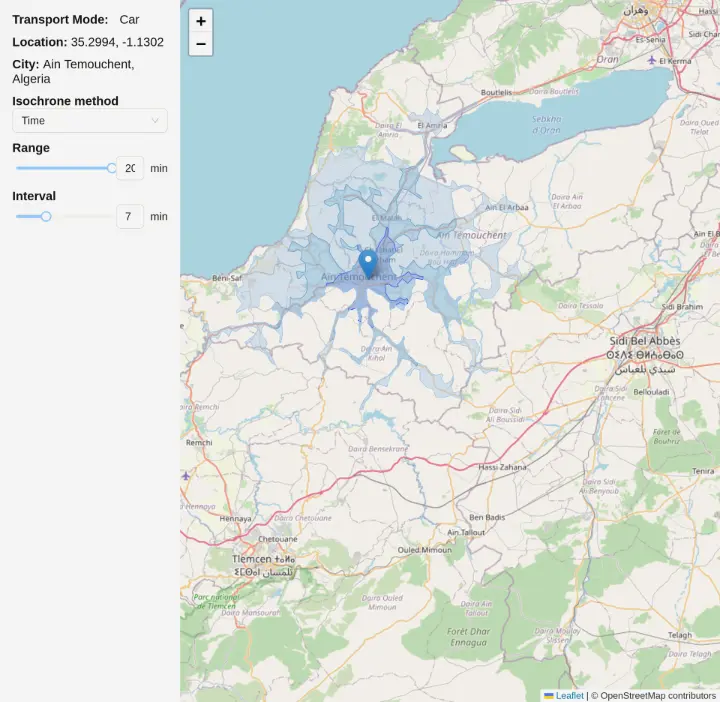
How It Works:
- Set your cafe location on the map.
-
Your app sends a request to the ORS Isochrones API via Deploily, with parameters like:
- range: [10, 20,30]
- interval: 10
- range_type: "time"
- units: "m"
-
The API responds with multiple polygon layers (GeoJSON), each representing an area reachable within the specified time.
- Display these time-based zones on your website map, assigning a unique color to each interval.
Benefits:
-
⏱️ Time-focused planning for more accurate travel estimates.
-
🎯 Multiple intervals for detailed, color-coded zones.
- 📦 Clean polygon output in GeoJSON.
- 🚶 Supports multiple transport modes (car, bike, foot).
-
⚡ Quick and easy integration into web or mobile apps.
🌍 What Is the ORS Isochrones API?
The OpenRouteService Isochrones API lets you compute reachability polygons from a geographic point based on either time (seconds) or distance (meters). It supports multiple transport profiles:
-
🚗 Driving (driving-car)
-
🚶 Walking (foot-walking)
-
🚴 Cycling (cycling-regular)
- And more...
This allows use cases like:
- “Where can I go in 10 minutes by foot?”
- “Which customers live within 5 km of this warehouse?”
- “What’s the coverage area of this health facility?”
📘 Full documentation: ORS Isochrones API Docs
📍 Project: Visualizing Isochrones Using ORS API
In this project, we demonstrate how to:
- Allow users to select a location on the map
- Request distance-based isochrones from the ORS API via Deploily
- Display the result as colored polygons representing reachable areas by distance
🔗 Clone the Project
git clone git@github.com:transformatek/geospatial-apis-javascript-tutorials.git
cd geospatial-apis-javascript-tutorials
📦 Install Dependencies
Make sure you have Node.js and npm (or yarn) installed on your machine.
Then, in your project directory, run:
npm install
# or
yarn install
This will install all necessary dependencies defined in your package.json, including Axios and Leaflet (if you use it to display the map).
🔐 Get Your API Key from deploily & set in your code (.env file)
NEXT_PUBLIC_ORS_API_KEY = your_api_key_here
⚙️ How the ORS Isochrones Service Works in Next.js
Let’s break down the logic of calculating isochrones using the OpenRouteService Isochrones API (via Deploily) in a Next.js + React Leaflet app.
🔐 The API key is added in the request header:
const headers = {
  'accept': 'application/json',
  'apikey': process.env.NEXT_PUBLIC_ORS_API_KEY, // Replace with your actual key
};
🚗 Get Isochrones for a Clicked Location:
const body = {
  locations: [[lon, lat]], // e.g., [2.35, 48.85]
  range: [1000, 2000, 3000], // Distance-based isochrones (in meters)
  range_type: 'distance',
  interval: 1000,
  units: 'km',
};

const response = await fetch('https://api.deploily.cloud/ors/v2/isochrones/driving-car', {
  method: 'POST',
  headers: {
    'Content-Type': 'application/json',
    ...headers,
  },
  body: JSON.stringify(body),
});

const data = await response.json();
The API returns a GeoJSON response with one or more polygons representing the reachable areas.
- The app parses the returned features list.
- Each polygon is added as a layer on the Leaflet map using GeoJSON.
▶️ Run the App
Start your local development server:
npm run dev
🗺️ Output
You’ll see a Flutter app where users can:
- Select a start and end location
- Request the optimal route in real time
- View the route displayed as a polyline on the map
📁 Source Code
You can find the full code on GitHub:
🔗 ORS Isochrones GitHub Repository
🔐 Subscribe to the ORS Isochrones API via Deploily
✅ Step 1: Visit the Deploily Website
Go to the official website:
 Then click on “Get Started” to access the API Developer Portal.
🌐 Step 2: Access the Developer Portal
You will be redirected to:
🔗 https://console.deploily.cloud/en/portal/home
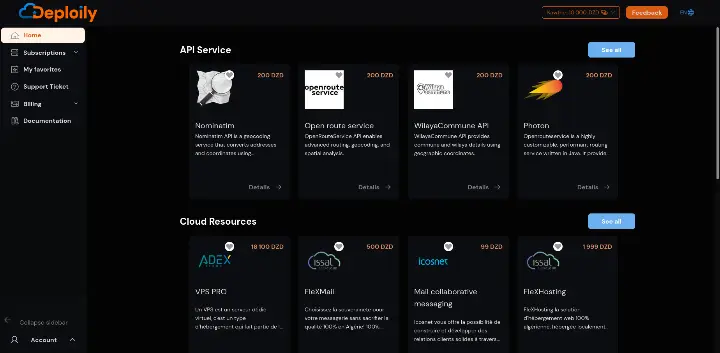 Here, you will see a list of available APIs. Look for Open Route Service API.
🔍 Step 3: Choose Your API Plan
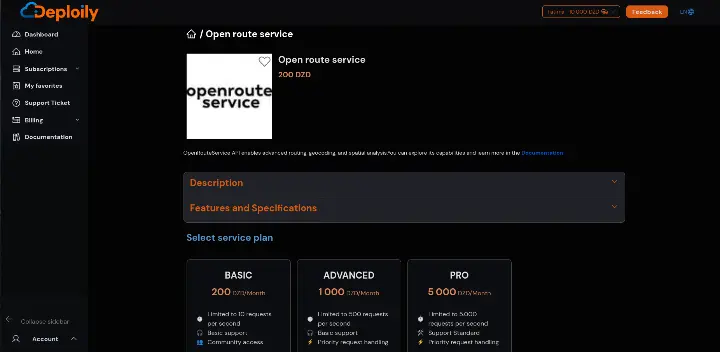
Click on Open Route Service API to see the details. Then choose a pricing plan
Click on the Subscribe button, specify the subscription period that meets your needs and confirm your subscription.
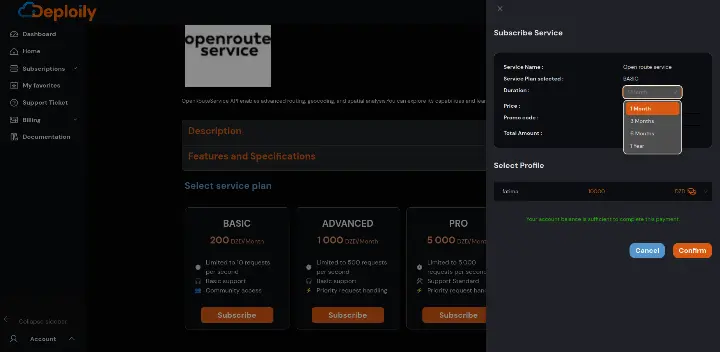
🔐 Step 4: Access Your Subscriptions and Generate Your API Key
After subscribing:
1.Go to the “My APIs” section.
2.Find your subscription to Open Route Service API.
3.Click on “Settings”.
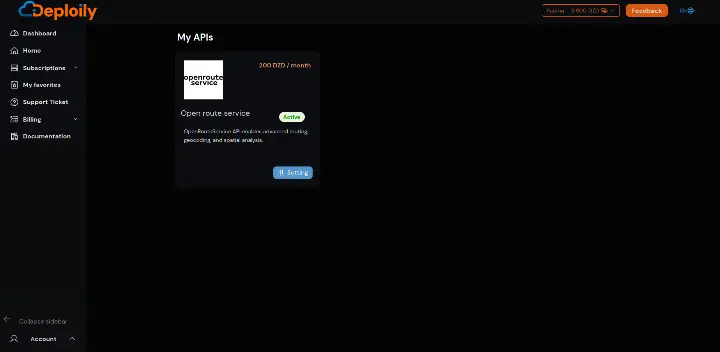
4.Click “Generate Key” to obtain your API key.
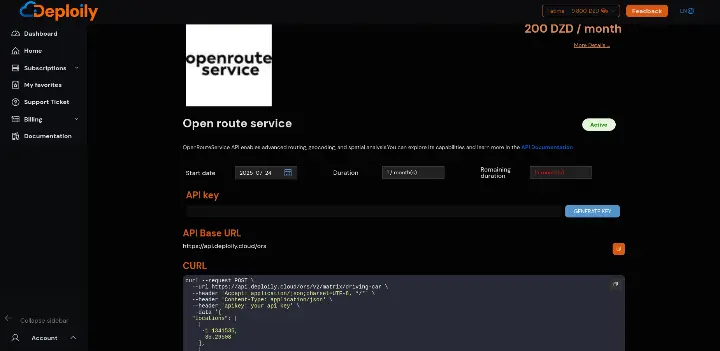

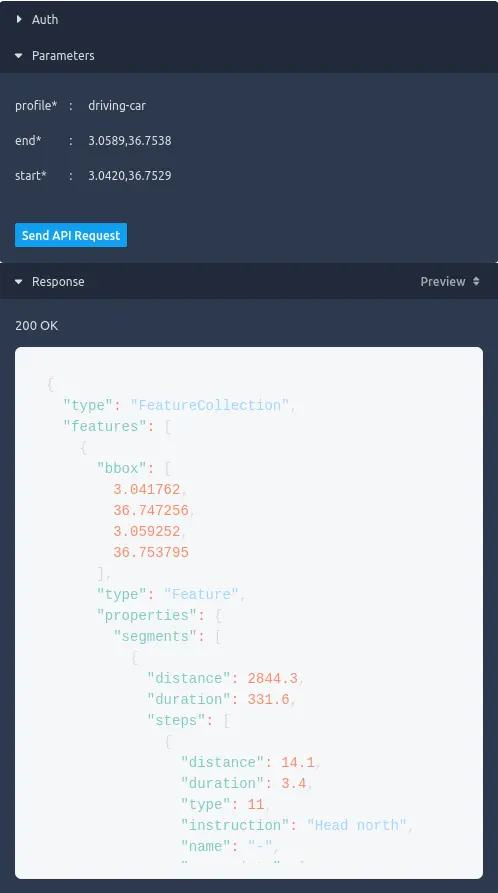
💡 Step 5: Test the API with Curl
Click on “API Documentation”
- in API Test Interface:
- Add Your API Key generated.
- Fill in the Required Parameters & send request
✅ Result
If everything is correct, you’ll receive a live JSON response like this:
⚙️ Using Curl to Query ORS Isochrones
curl -X POST https://api.deploily.cloud/ors/v2/isochrones/driving-car \
-H "apikey: your_api_key" \
-H "Content-Type: application/json" \
-d '{
"locations": [[3.059, 36.753]],
"range": [300, 600, 900],
"interval": 300
}'
🧭 Conclusion: Isochrone Intelligence with Deploily ORS
For any app that depends on geographic reachability, urban coverage, or mobility analysis, the ORS Isochrones API via Deploily gives you everything you need:
- ✅ Real-time reachability polygons
- 🚶 Multi-modal support
- 🧩 Easy integration in Leaflet, Flutter, React
- 🔐 Transparent and self-hosted API model
Build smarter, faster, and free from vendor lock-in.