?unique=e25d5a2)
Introduction à l’API ORS Matrix de Deploily
When building applications that involve routes, travel times, or delivery optimization, it becomes essential to calculate the distance and duration between multiple geographic points.
Thanks to the ORS Matrix API provided by Deploily, you can easily generate distance and duration matrices between multiple locations, using different travel modes such as driving, walking, or cycling.
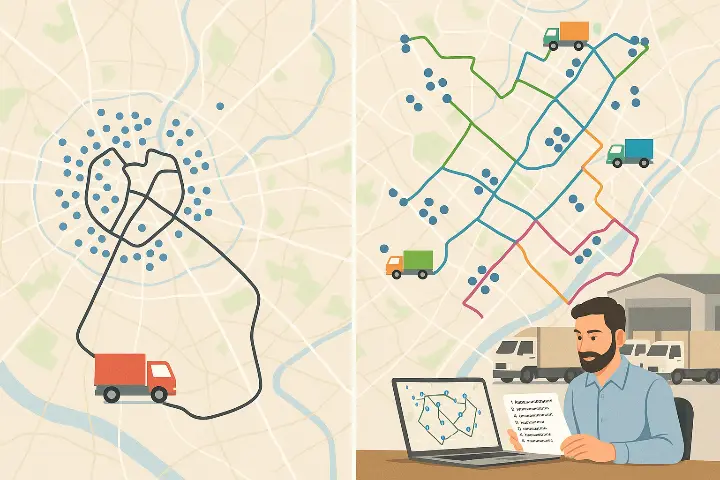
🚛 Cas d’usage stratégique : Optimisation de tournées pour une flotte de camions de livraison
🏢 Context
You are the logistics manager of an e-commerce company or a distribution warehouse. Every day, between 50 and 100 deliveries must be completed across a city or region.
You have several vehicles (e.g., 5 trucks), and you need to:
- 🧭 Assign deliveries to each truck
- 🛣️ Optimize the route for each vehicle
- ⏱️ Minimize driving time and distance
- 💸 Reduce fuel, labor, and CO₂ costs
🧠 Problem to Solve
Without optimization tools:
- Your drivers follow non-optimized routes
- The cost per delivery is high
- You waste time and fuel, and your customer service suffers
🚀 Solution with ORS Matrix
🎯 Retrieve the list of daily destinations (GPS coordinates of 70 customers)
🧠 Use ORS Matrix to generate the distance and duration matrix
🧮 Apply a VRP (Vehicle Routing Problem) algorithm to:
- Split routes between trucks
- Optimize each delivery round
📤 Send each driver their optimized itinerary, with the delivery order
🔍 What is the ORS Matrix API?
The ORS Matrix API is part of the Deploily Geospatial Suite. It allows you to generate a square or rectangular matrix of distances and travel times between multiple locations.
You get:
- 🛣️ Distances in kilometers
- ⏱️ Durations in seconds
It supports multiple travel modes:
- 🚗 Driving: driving-car
- 🚶♂️ Walking: foot-walking
- 🚴♀️ Cycling: cycling-regular
⚙️ Setup & Installation
📥 Clone the project
git clone https://github.com/transformatek/geospatial-apis-python-tutorials.git
cd geospatial-apis-python-tutorials
📦 Install dependencies
pip install -r requirements.txt🔐 Set your API key
export API_KEY=your_api_key_here
🚀 How the Script Works
1️⃣ Load the API key
import os
API_KEY = os.getenv("API_KEY")
2️⃣ Build the API request
import requests
url = "https://api.deploily.cloud/ors/v2/matrix/driving-car"
headers = {
    "Accept": "application/json",
    "Content-Type": "application/json",
    "apikey": API_KEY
            }
payload = {
       "locations": [
       [8.681495, 49.41461],     # Point A
       [8.687872, 49.420318]     # Point B
        ],
       "metrics": ["duration", "distance"],
       "units": "km"
         }
response = requests.post(url, json=payload, headers=headers)
📤 Example Response
{
"distances": [[0.0, 1.1], [1.1, 0.0]],
"durations": [[0.0, 60.2], [60.3, 0.0]]
}
📂 Full Source Code
You can view and clone the full script from our GitHub repository:
👉 [ORS MATRIX SCRIPT](https://github.com/transformatek/geospatial-apis-python-tutorials/blob/main/api-ors/matrix_duration.py)
🔐 Subscribe to the ORS Directions API via Deploily
✅ Step 1: Visit the Deploily Website
Go to the official website:

Then click on “Get Started” to access the API Developer Portal.
🌐 Step 2: Access the Developer Portal
You will be redirected to:
🔗 https://console.deploily.cloud/en/portal/home
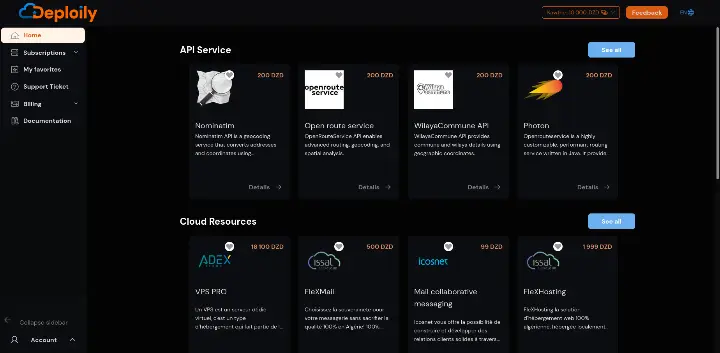
Here, you will see a list of available APIs. Look for Open Route Service API.
🔍 Step 3: Choose Your API Plan
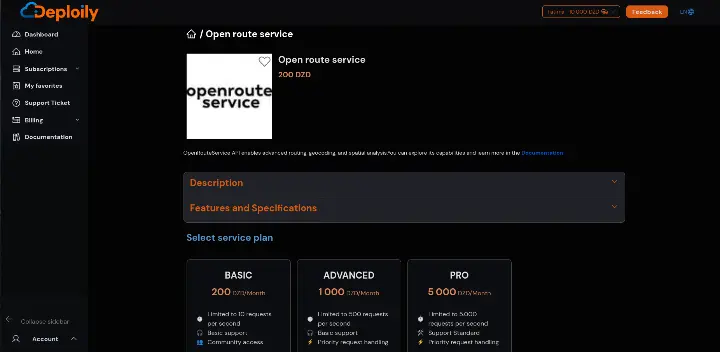
Click on Open Route Service API to see the details. Then choose a pricing plan
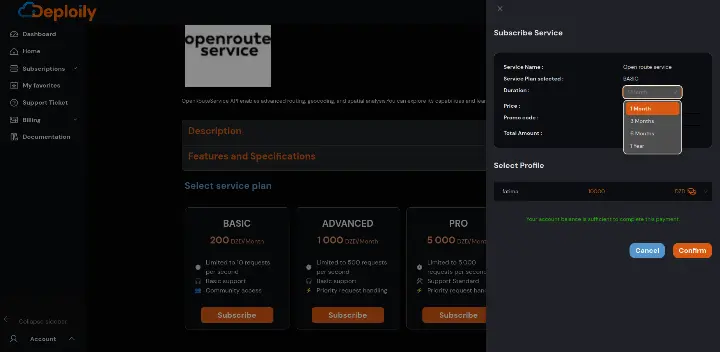
Click on the Subscribe button, specify the subscription period that meets your needs and confirm your subscription.
🔐 Step 4: Access Your Subscriptions and Generate Your API Key
After subscribing:
1.Go to the “My APIs” section.
2.Find your subscription to Open Route Service API.
3.Click on “Settings”.
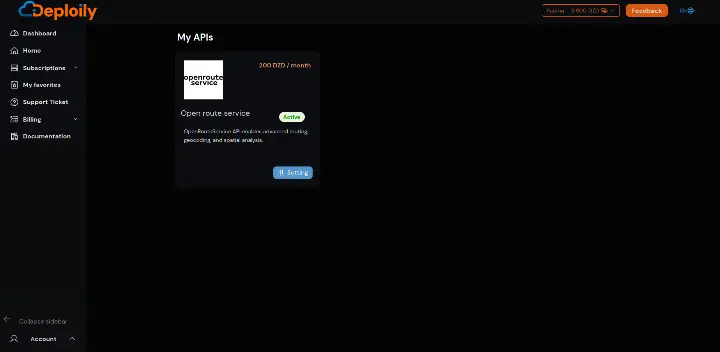
4.Click “Generate Key” to obtain your API key.
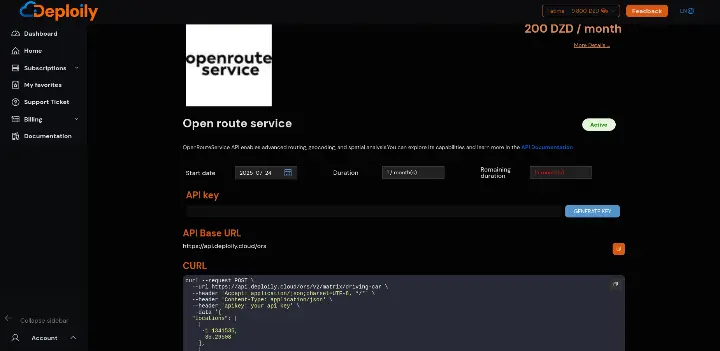
💡 Step 5: Test the API with Curl
Click on “API Documentation”
- in API Test Interface:
- Add Your API Key generated.
- Fill in the Required Parameters & send request
🧠 Conclusion
With the ORS Matrix API from Deploily, you have a powerful tool to:
- 🧮 Quickly calculate distances & durations
- 📍 Optimize delivery or service routes
- 📦 Improve the logistics and efficiency of your applications
Start integrating geospatial intelligence into your Python applications today with Deploily 🚀